Most personal blogs today fall into one of three categories:
- generic static sites
- heavy client-rendered React apps
- hosted platforms like Medium or Hashnode
I wanted something different.
I wanted a blog that felt more like an engineered platform than a traditional personal site:
- Globally fast
- Content-first
- Visually unique
- Highly interactive
- Extremely cheap to operate
- Fully owned end-to-end
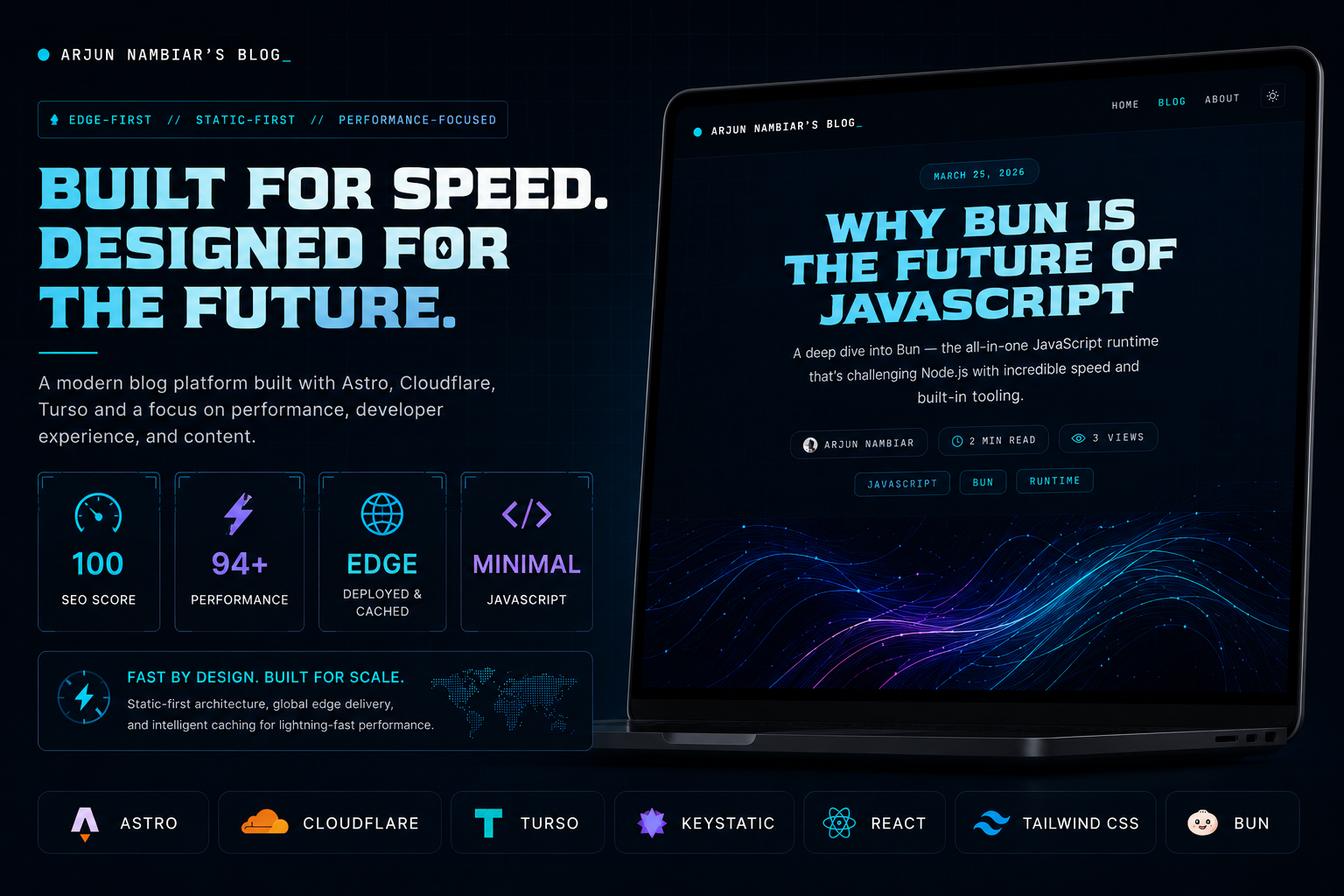
So over the last few weeks, I created this entire blog platform from scratch using Astro, Cloudflare, Turso, React islands, Giscus and a bunch of frontend experimentation.
This post breaks down the architecture, engineering decisions, tradeoffs, and lessons learned while building it.
The Goal
My goal simply put was to create a platform that could serve as:
- a space for writing and sharing technical ideas
- a playground for frontend engineering and UI experimentation
- a place to document architectural decisions, tradeoffs, and lessons learned
- and eventually something polished enough to genuinely feel proud of
Performance mattered a lot.
I wanted:
- static HTML by default
- minimal JavaScript
- edge delivery
- selective hydration
- excellent Lighthouse scores
- and smooth interactions without turning the site into a client-side app
The Stack
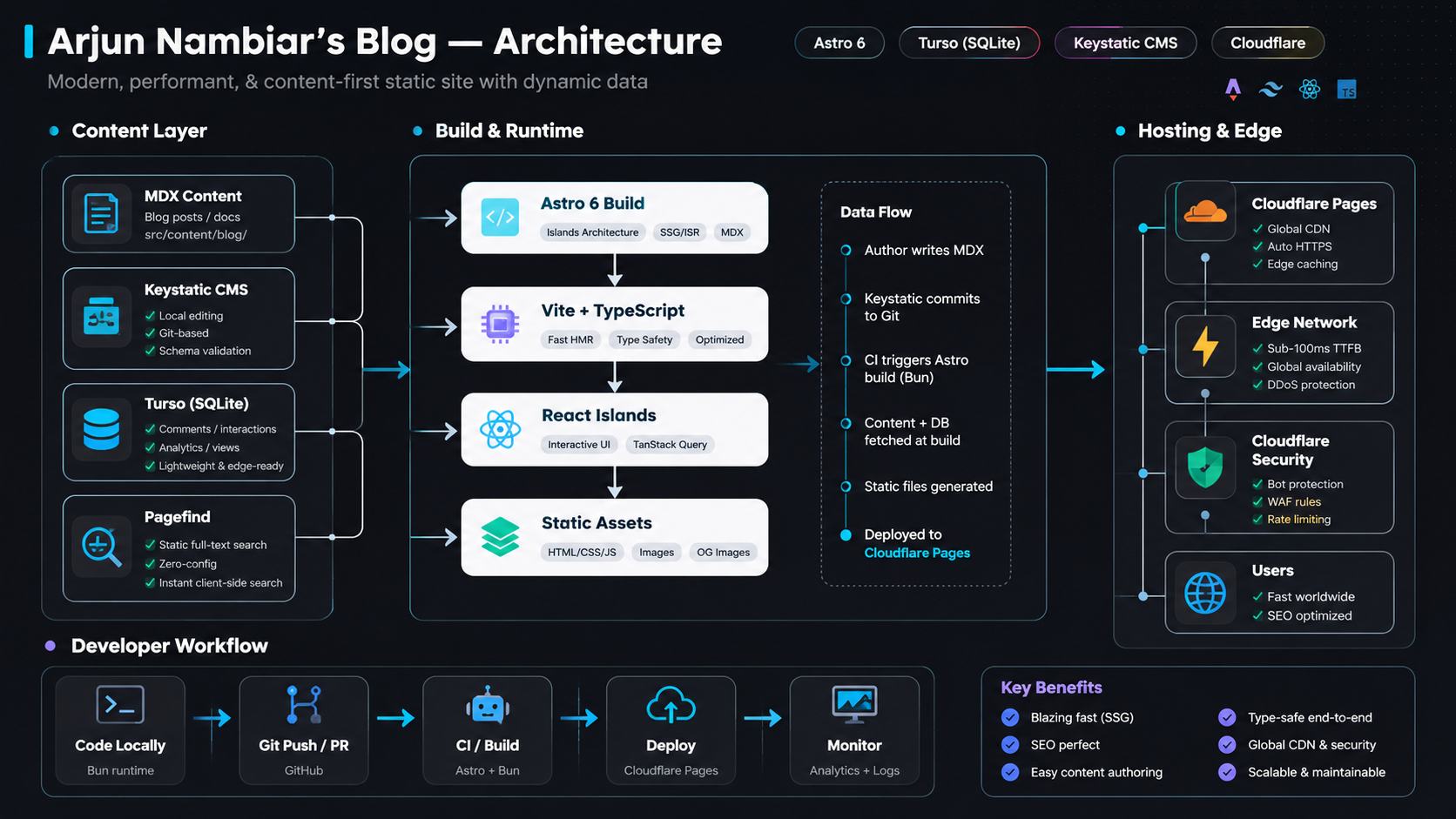
Here’s the core stack powering the platform:
| Layer | Technology |
|---|---|
| Framework | Astro 6 |
| Interactive Islands | React 19 |
| Styling | Tailwind CSS v4 |
| Deployment | Cloudflare Pages |
| APIs | Cloudflare Workers |
| Database | Turso |
| ORM | Drizzle ORM |
| CMS | Keystatic |
| Search | Pagefind |
| Comments | Giscus |
| Runtime | Bun |
Some factors in my mind while choosing these technologies:
- performance
- developer experience
- edge compatibility
- and long-term maintainability
Why Astro?
One obvious question here is: why Astro instead of something like Next.js?
Astro felt like the perfect fit for this project.
Most pages on a blog don’t need JavaScript at all, and Astro’s Islands Architecture made it possible to ship static HTML by default while hydrating only the interactive parts like:
- comments
- likes
- search
- and theme toggles
This kept the site lightweight while still allowing rich UI interactions, resulting in:
- tiny JS payloads
- fast initial loads
- strong Lighthouse scores
- and better SEO
Another reason I chose Astro was timing. The framework has been gaining a lot of traction recently, especially after being acquired by Cloudflare, and I wanted to experiment with something new that aligned closely with the edge-first ecosystem I was already building around.
Ironically, one of the biggest lessons while building this project was learning when not to use React. I initially over-engineered parts of the app with too many React islands and unnecessary react-query states, to the point where it started feeling more like a React app running inside Astro than an Astro site itself.
Edge-First Deployment with Cloudflare
After deciding on Astro, the next question was where to deploy it.
Since Astro had recently been acquired by Cloudflare, I started exploring Cloudflare’s ecosystem more deeply, and it ended up fitting this project really well - especially with how generous the free tier is for personal projects.
The platform is deployed on Cloudflare’s edge network using:
- Cloudflare Pages for deployment
- Cloudflare Workers for APIs
- Cloudflare CDN for caching and global delivery
I also ended up appreciating Cloudflare Workers more than I expected. Their live logs made debugging edge runtime issues and Turso integration problems significantly easier during development.
But one thing I underestimated initially was how differently Cloudflare Workers behave compared to a traditional Node.js environment.
At some point, I had optimized the project so heavily around the Cloudflare runtime that parts of the app simply stopped working properly in local Node-based development.
I eventually had to split adapters between production and development environments and even introduce a small Workers shim locally just to keep the developer experience sane again.
That said, the combination of:
- global edge delivery
- automatic deployments
- built-in caching
- SSL
- and DDoS protection
made Cloudflare an easy choice for this project.
Why Turso?
For a content platform like this, a distributed SQLite database felt surprisingly appropriate.
I’m using Turso for:
- page views
- analytics
- interaction systems
- likes
- lightweight dynamic functionality
Instead of maintaining a centralized Postgres instance, Turso keeps the infrastructure lightweight while still supporting globally distributed reads through edge replication.
One of the biggest reasons I liked the Cloudflare Workers + Turso combination was cost efficiency. Cloudflare Workers already has a pretty generous free tier with 100k requests/day, while Turso’s free tier includes hundreds of millions of row reads per month along with multiple edge replicas. (Cloudflare Docs) (Turso Docs)
For a personal blog or lightweight platform, that basically removes the need to think much about infrastructure costs early on.
Since both the compute and the database can live close to the user, the whole stack ends up feeling extremely lightweight and fast without needing traditional server infrastructure.
It also integrates really nicely with Drizzle ORM and edge runtimes.
I did run into some interesting debugging challenges along the way though - enough that I’m planning a separate post entirely around Turso + Cloudflare Workers.
Keystatic Was a Perfect Choice
Once I had settled on Astro, Cloudflare, and Turso, the next challenge was figuring out how I actually wanted to write and manage content.
I knew I didn’t want a workflow where I had to manually edit Markdown files every single time I wanted to publish something. I wanted a system that would let me:
- write blogs from anywhere
- publish quickly even while travelling or using my phone
- and most importantly, provide a responsive rich-text editing experience
Initially, I considered building the entire admin interface myself - something that would let me create, edit, preview, and manage posts directly from the site.
While researching CMS options (with a lot of help from AI recommendations and documentation rabbit holes), I came across Keystatic, and it ended up solving almost everything I needed out of the box.

What made it particularly attractive was that:
- it’s open source
- actively improving
- trusted by a lot of developers
- and built around a Git-based workflow
That last part mattered a lot because all the blog content in this project lives directly inside the repository as Astro content collections for faster static builds and loading.
Keystatic essentially became the perfect bridge between:
- a modern writing experience
- and a Git-backed content system.
Search But With a Twist
I wanted search functionality, but without introducing another external service or maintaining a dedicated backend just for indexing content.
While researching different options through Google, Reddit, GitHub discussions, and a lot of AI-assisted exploration, I heard about Algolia, and briefly thought of using it, but it felt unnecessary for a mostly static content platform.
Then I came across Pagefind - an open-source search project built specifically for static sites. Surprisingly, despite being extremely well-designed for this use case, it still has only around 5.2k GitHub stars, which honestly feels a bit underrated.
What immediately stood out was how well it aligned with Astro’s static-first philosophy. Instead of relying on external infrastructure, Pagefind generates a full-text search index during the build process itself and ships it alongside the static assets.
I also liked the amount of control it gives over indexing. Using attributes like data-pagefind-body, you can decide exactly which parts of the page should be searchable instead of indexing the entire DOM blindly.
The integration itself was pretty straightforward using @pagefind/default-ui, although I did have to slightly modify the build process so the search index gets generated after Astro finishes building the site:
"build": "astro build && npx pagefind --site dist/client"
The end result feels surprisingly fast without adding much additional infrastructure or complexity to the project.
Comments with Giscus
I knew pretty early on that I didn’t want to build a custom comment system for this project.
Storing comments in my own database would’ve meant:
- additional reads/writes
- moderation logic
- authentication flows
- spam prevention
- abuse protection
- and extra client-side loading complexity
For a blog, that felt like unnecessary overhead.
While researching alternatives, I came across Giscus, which uses GitHub Discussions as the backend for comments. That approach immediately made sense for this project because the audience is mostly developers anyway, meaning most readers already have GitHub accounts.
The integration itself was surprisingly easy since someone had already built the @giscus/react component, so getting it working inside Astro took very little effort.
What I liked most was that it completely removed the need to implement my own auth system. I didn’t want readers to go through a dedicated signup/login flow just to leave a comment because that instantly creates friction and increases churn.
With Giscus:
- anyone can simply read the blog without interruptions
- developers who genuinely want to comment can sign in with GitHub in a single step
- comments automatically sync with GitHub Discussions
- and moderation becomes significantly easier
An added bonus is that GitHub already handles a lot of the abuse prevention, spam mitigation, and rate limiting concerns that I otherwise would’ve had to think about myself.
Honestly, it ended up being one of the highest value-to-effort integrations in the entire project.
Dynamic OG Image Generation
I also wanted every blog post to have its own custom social preview card instead of relying on generic screenshots or manually designed thumbnails.
The OG images are generated dynamically using:
- Satori
- Resvg WASM
- and custom layouts/components
Initially, I planned to use Sharp for image generation since that’s what most examples online were using. But after spending some time researching and experimenting, I eventually switched to @resvg/resvg-wasm instead.
The WASM-based approach ended up fitting the Cloudflare environment much better and avoided a lot of the deployment friction native image-processing libraries can introduce.
Each post now automatically gets a consistent branded preview image for platforms like:
- X
- Discord
without needing to manually design thumbnails every time a new article is published.
Frontend & UI Systems
A huge part of this project was experimenting with frontend interactions and UI systems without letting the site become unnecessarily heavy.
I built the frontend using Tailwind CSS v4, which had just released around the time I started the project. It felt like the right opportunity to experiment with some of the newer improvements and workflow changes introduced in v4.
I also knew from the beginning that the blog needed both light and dark themes. Different developers strongly prefer different reading experiences, especially for longer technical content, so supporting both properly felt important instead of treating dark mode as an afterthought.
That led to building:
- an animated theme toggler
- motion-heavy blog cards
- spotlight hover effects
- gradient systems
- subtle glow animations
Initially, I definitely over-engineered parts of the frontend. A lot of components started as React islands by default, and I even introduced unnecessary client-side state in places where Astro could’ve handled things statically.
Over time, I started simplifying aggressively:
- porting many React islands back to Astro components
- changing several
client:only="react"islands intoclient:visible - removing unnecessary JavaScript-heavy animations
- replacing interaction-heavy effects with CSS-based animations where possible
- and cleaning up overlapping styles between
global.cssand component-level styling
Some of the more premium interactions still remain, especially around the blog cards and motion systems, but the goal slowly shifted from:
“make everything animated”
to:
“make interactions feel intentional without hurting performance.”
A lot of the Lighthouse and SEO improvements actually came from these frontend decisions:
- reducing hydration
- simplifying DOM structure
- improving semantic HTML
- restructuring content hierarchy
- reducing unnecessary client-side rendering
- and aggressively minimizing runtime JavaScript
Ironically, some of the biggest performance wins came from removing things instead of adding more optimizations on top.

Cost Breakdown
One of the funniest parts of this project is how cheap the infrastructure actually is.
Current monthly cost is roughly:
| Service | Cost |
|---|---|
| Cloudflare Pages | Free |
| Cloudflare Workers | Mostly Free |
| Turso | Free / Extremely Low |
| Pagefind | Free |
| Keystatic | Free |
| Giscus | Free |
For the kind of architecture this project uses, the overall cost still feels kind of absurdly low.
Final Thoughts
This project ended up teaching me way more than I expected.
Not just about Astro, frontend performance, or Cloudflare Workers, but about how differently you start thinking once you fully own the entire system end-to-end.
This was also my first time seriously using Cloudflare as a hosting platform, and it pushed me into thinking much more from an edge-first perspective instead of a traditional “deploy and forget” mindset.
I found myself thinking about things I normally wouldn’t care much about in smaller projects:
- bot protection
- DDoS mitigation
- rate limiting
- WAF rules
- database schema design
- caching strategies
- response times
- and reducing unnecessary client-side work wherever possible
A lot of the project slowly became less about “building a blog” and more about architecting a system properly.
One thing I became almost obsessed with during development was load time. For a mostly static content platform, even a few hundred milliseconds starts feeling noticeable, and realistically, most people simply won’t wait around for content to load if it feels slow.
I realized how satisfying it is to fully control:
- the architecture
- the deployment
- the content system
- the interactions
- and the performance characteristics yourself.
And honestly, this still feels like the beginning.
The repo is open source if anyone wants to explore the implementation details, use parts of it as reference, or suggest improvements/features through discussions.
Link: Blog-With-Astro
This was also my first time writing a long-form technical blog like this, so I’m sure there’s still a lot to improve - both in the platform and the writing itself.
Thanks for reading!!